
See a home.
Point your phone.
Start the stream.
Discover a home right where you are. HomeStream’s original concept uses your GPS location and the direction your phone is pointing to help match the property in front of you—then open its listing, photos, and available video or 3D tours.
Nearby listing streams. GPS discovery. The home that caught your eye.

The home that caught your eye
Point. Confirm the match. Explore the listing.
Less typing addresses.
More discovering homes.
A house catches your eye. Your phone helps connect that moment to its property listing and media stream.
The home in front of you, brought into focus.
Open Point at a Home and allow location access. Your GPS position and phone’s compass direction help identify nearby candidate properties. Confirm the right home before opening its stream.
- Stand where you can see the home.Open the app and allow foreground location access.
- Point your phone toward the property.GPS provides your position; the compass provides direction.
- Confirm the match and explore.Open the listing, photos, and available video or 3D tours.
Nearby homes can overlap in the same direction. The planned experience offers alternatives when a match is uncertain.
Less searching.
More finding.
Start with what matters to you. Explore the neighborhood, save the possibilities, and get a clearer picture of your next move.
A neighborhood worth exploring.
Use GPS-based nearby discovery or point your phone toward a home. The planned matching experience combines location and compass direction, then opens the confirmed property’s listing and available media.
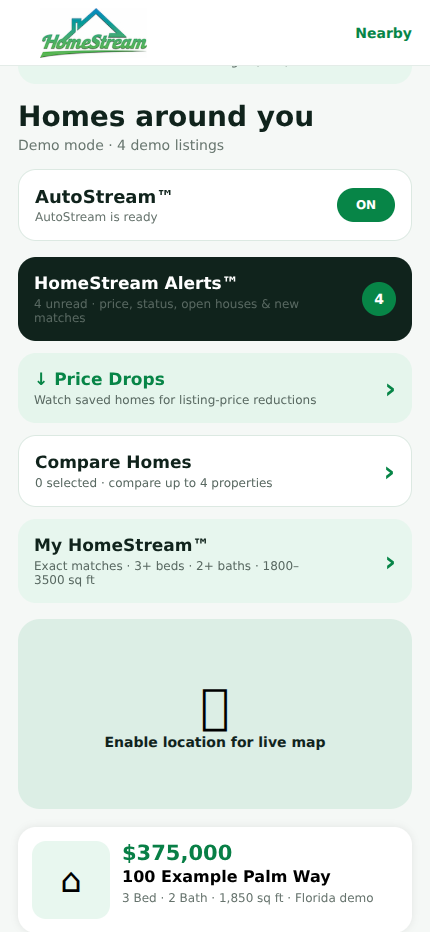
Screens show the current prototype with sample properties and simulated transactions. Live listing data and professional services are not connected.
A shared journey.
A place for everyone.
Buying and selling a home takes more than one person. HomeStream’s vision brings the people and next steps closer together.
Your wish list.
Your neighborhood.
Your next home.
Explore homes for sale and rent with your preferences in mind. Save favorites, compare up to four homes, and follow the changes that could make a difference.
- Personal profiles and preference matching
- Saved homes and side-by-side comparisons
- Price-drop, new-match, and open-house alerts
One move.
More clarity at every step.
A connected process, with the right professionals involved along the way. Select a step to see how it fits.
Begin with a clearer buying picture.
BuyerReady previews a lender-connected preparation process before home shopping. The current app lets you explore sample lender selection and simulated approval stages.
HomeStream is on its way.
A nationwide vision. A working prototype. A more connected way to move.
Public downloads and live services will be announced when available.
Before your
next move.
Can I download HomeStream today?
HomeStream is currently a working prototype. Public App Store and Google Play downloads have not launched. This website introduces the app and lets you explore its existing screens.
How does pointing my phone find a home?
Point at a Home combines foreground GPS location with your phone’s compass heading to identify likely nearby properties in the direction you are pointing. You confirm the matching home before opening its listing stream. It is a location-and-direction concept, not a claim that the camera recognizes every house. Live matching needs licensed listing and parcel data.
What is a streaming listing?
A property-centered stream brings listing details, photos, and available video or 3D tours together. Nearby discovery and opt-in AutoStream are designed to surface properties as you explore. Media availability depends on the property’s listing and licensed provider; the prototype uses sample data.
Will HomeStream work nationwide?
Nationwide discovery is the goal. Live availability will depend on licensed property data and participating professionals in each market. The current prototype uses sample listings.
Does it support both buying and renting?
Yes. The prototype includes sale and rental discovery, personal preferences, saved homes, and comparisons. Offer, contract, title, and closing workflows apply to home purchases.
Can I get preapproved or close through it now?
BuyerReady and CloseReady currently demonstrate the process using fictional information. They do not submit real loan applications, pull credit, run title searches, transfer funds, or record a sale. Live services require participating providers.
What about contracts and signatures?
The prototype includes a Florida FAR/BAR AS IS preparation workflow with simulated routing and signatures. Official forms are not embedded. Live use will require licensed forms, professional review, signing services, and state-specific support.
How will professionals participate?
The planned ecosystem includes agents, lenders, title and closing teams, and nearby home-service providers. Partner onboarding and live integrations are still being developed; you can contact us to discuss the planned ecosystem.